
How to Create a WhatsApp Campaign That Actually Works: A Step-by-Step Guide
Did you know that WhatsApp is the most popular messaging app in the world, with over 3.3 billion monthly active users across 180 countries?
That’s right: your next WhatsApp campaign has the potential to reach nearly half of the world’s population. WhatsApp messages achieve an incredible 98% open rate, compared to just 21.33% for email. Personalized WhatsApp marketing campaigns can increase conversion rates by up to seven times.
But the benefits don’t stop there. Compared to other marketing channels, the WhatsApp Business Platform drives 89% more purchases per user. It’s particularly effective for eCommerce and service brands, increasing six-month retention rates by 42% and boosting average customer lifetime value by 70% compared to other channels.
It’s no surprise that marketers consistently rank WhatsApp as their #1 preferred messaging channel in the Global Customer Engagement Review 2024. With rich media capabilities and interactive features like quick reply buttons and call-to-action buttons, WhatsApp removes friction and enhances the customer experience.
Ready to create a WhatsApp campaign that actually works? This step-by-step guide will show you exactly how to leverage this powerful platform to connect with your audience, drive conversions, and build long-lasting customer relationships.
What Makes WhatsApp a Powerful Marketing Channel
WhatsApp has transformed into a marketing powerhouse for businesses seeking deeper customer connections and higher conversion rates. Here’s exactly why this messaging platform stands apart from traditional marketing channels and how you can leverage it for your next campaign.
High engagement and open rates
The numbers tell the complete story when it comes to WhatsApp’s engagement potential. While email marketing typically achieves open rates of just 20-30%, WhatsApp messages boast an impressive 98% open rate. Even more impressive, 88% of these messages are read within the first five minutes of delivery. This extraordinary level of engagement creates unprecedented opportunities for marketers to reach customers almost instantly.
When you examine click-through rates (CTR), the contrast becomes even more striking. WhatsApp promotional content achieves 45-60% CTR, dramatically outperforming email’s typical 2-5%. Personalized promotional messages on the platform have achieved open rates as high as 85%, compared to 65% for generic broadcasts.
This exceptional engagement isn’t coincidental. Studies reveal that 66% of online adults prefer messaging as their primary method of communicating with businesses, with that percentage rising to 72% among 18-34 year-olds. Brands report that 40% of users make purchases through the platform, demonstrating how WhatsApp campaigns translate engagement into actual revenue.
Global reach and mobile-first behavior
As the world’s most popular messaging app, WhatsApp provides unparalleled access to a global audience. With over 3 billion monthly active users across 180+ countries, your WhatsApp marketing campaign can reach approximately 40% of the world’s population.
This extensive reach spans diverse markets and demographics. The platform dominates communication in regions like Latin America, India, and Southeast Asia, where it serves as many users’ primary messaging service. WhatsApp’s presence is growing rapidly in markets like Indonesia, the United States, South America, and parts of Europe.
The mobile-first nature of WhatsApp aligns perfectly with modern consumer behavior. Approximately 100 billion messages are sent daily across WhatsApp, Messenger, and Instagram Direct, reflecting how deeply messaging has become embedded in daily communication habits worldwide. The average user spends over 30 minutes in the app daily, creating ample opportunities for meaningful brand interactions.
Why it outperforms email and SMS
WhatsApp offers distinct advantages that make it superior to traditional marketing channels like email and SMS. First, its rich media capabilities enable dynamic content that traditional channels cannot match. Unlike SMS’s text-only limitations, WhatsApp supports images, videos, PDFs, location sharing, interactive lists, and clickable call-to-action buttons.
The platform also facilitates genuine two-way conversations. Instead of one-directional email blasts, WhatsApp nurtures ongoing dialogs where customers can reply, ask questions, browse product carousels, and complete purchases—all within a single thread. This conversational approach yields tangible results, with 1.9X higher open rates and 5X higher click-through rates compared to email.
Another significant advantage is WhatsApp’s cost-effectiveness, especially for international communications. While SMS charges increase significantly for international numbers, WhatsApp messages cost the same regardless of recipient location. This makes global WhatsApp campaigns more economically viable than traditional SMS marketing.
Trust and security further differentiate WhatsApp from other channels. The platform’s end-to-end encryption reassures privacy-conscious consumers making purchase decisions. Additionally, features like business account verification (green checkmark) build customer confidence, creating a secure environment for transactions and sensitive information sharing.
For businesses implementing WhatsApp marketing campaigns, these advantages translate to measurable outcomes. Companies using WhatsApp Business Platform report a 58% increase in leads compared to traditional marketing channels, making it an essential component of any comprehensive marketing strategy.
Step 1: Set Up Your WhatsApp Business Account
Before launching your WhatsApp campaign, you need to lay the right foundation. Properly setting up your business account is critical to success and determines which features you’ll have access to.
Choose Between the WhatsApp Business App and the API
First, you need to decide which WhatsApp business solution best fits your needs. The platform offers two distinct options with different capabilities:
WhatsApp Business App It is designed specifically for small businesses and solo entrepreneurs. It’s free to download and use, making it accessible for companies with limited resources. The app provides essential features such as business profiles, quick replies, and greeting messages to improve customer interactions.
WhatsApp Business API It is built for medium and large businesses that need to handle higher message volumes and require advanced features. It is specifically designed for companies that want to communicate with customers at scale throughout the entire customer lifecycle.
Key differences to consider:
The Business App is tied to a single device, while the API can be integrated with your existing CRM systems.
The API requires WhatsApp approval before launch, unlike the app.
A phone number can only be registered on the app or the API, not both at the same time.
The API is not free and requires payment for Business-Initiated and User-Initiated Conversations, with pricing that varies by country.
We recommend choosing the API if you need team collaboration, automation at scale, or CRM integration. Select the app if you’re a small business with simpler requirements.
After selecting your platform, verification is essential to establish credibility. WhatsApp offers different account levels:
Business Account (default): Your profile is active, but your business name appears only in limited views.
Verified Business Account: Meta confirms your business information and displays your business name instead of your phone number.
Official Business Account: The highest level, with a green verification badge, requiring a strong online presence.
To verify your business through Meta Business Manager:
Go to Security Center > Start Verification
Submit your legal business name, address, phone number, and website
Complete the two-step phone verification
Provide website and social media links to prove your business legitimacy
Submit the required documents and wait for Meta’s review (typically from 10 minutes up to 14 business days)
Once verified, complete your business profile thoroughly by adding:
Business name and category
Description
Business hours
Location information
Contact details (website, email, phone)
Product catalog
A complete profile works much like a website, establishing your business identity on WhatsApp and increasing customer trust.
Understand Messaging Limits and Compliance
Initially, unverified businesses are limited to 250 business-initiated conversations within a 24-hour period. Verified businesses start with 1,000 conversations and can scale to:
10,000 unique customers
100,000 unique customers
Unlimited unique customers
To increase your messaging limits:
Maintain high message quality
Ensure that at least half of your messages are opened
Send engaging, high-quality content
For compliance, you must:
Obtain explicit opt-in permission before sending messages to customers
Clearly state your business name when collecting consent
Honor all user requests to opt out or block communications
Only initiate conversations using approved Message Templates
Respond to user-initiated messages within 24 hours without templates
Maintain proper escalation paths for customer support
Ensure you have the necessary permissions to collect user data
Remember that messaging limits are calculated at the business portfolio level and are shared across all phone numbers within that portfolio. If you reach your daily limit, subsequent messages will not be delivered until existing conversations expire.
By properly setting up and verifying your WhatsApp Business account, you create a strong foundation for successful campaigns that build customer trust while complying with platform policies.
Step 2: Build and Segment Your Contact List
Building a high-quality WhatsApp contact list forms the backbone of any successful campaign. Unlike traditional marketing, WhatsApp requires strict adherence to consent policies while offering powerful segmentation capabilities that can dramatically improve results.
How to Collect Opt-Ins Legally
WhatsApp’s November 2024 policy update requires explicit permission before sending any messages to customers. According to the platform’s guidelines, you may only contact individuals who have provided their mobile number and given clear opt-in consent to receive communications from your business.
To collect legally compliant opt-ins:
- Clearly state that the person is opting in to receive communications
- Explicitly mention your business name in the opt-in request
- Ensure your methods comply with applicable local laws
- Honor all requests to block, discontinue, or opt out of communications
Proper consent builds trust while protecting your business account. Remember, providing a phone number alone does not constitute consent for WhatsApp marketing. However, opt-ins do not necessarily need to be WhatsApp-specific as long as they comply with local regulations.
Use Your Website, Social Media, and QR Codes
Once your account is ready, you need effective entry points to grow your subscriber list. Website integrations serve as primary opt-in channels—implement pop-ups, signup forms, or checkout page options that clearly explain what subscribers will receive.
QR codes are one of the most effective ways to collect opt-ins in both digital and physical environments. They act as direct bridges between offline touchpoints and your WhatsApp channel. Consider placing QR codes in:
- Retail stores near checkout counters
- Product packaging with clear value propositions
- Social media campaigns with incentives
- Email signatures with brief explanations
- Event materials and trade show displays
Social media platforms also offer powerful opt-in opportunities. Implement Click-to-WhatsApp ads on Facebook and Instagram that direct users straight into a conversation with your business. Then, create dedicated posts explaining the benefits of joining your WhatsApp channel, highlighting exclusive content or special offers.
Segment by Behavior, Location, or Purchase History
Next, the true power of WhatsApp marketing emerges through proper audience segmentation. Dynamic segmentation groups customers based on real-time behaviors, preferences, and engagement patterns, automatically updating your lists whenever someone meets your defined criteria.
According to WhatsApp marketing experts, the most effective segments include:
- High-intent buyers: People who viewed products or added items to their cart without completing a purchase
- Loyal customers: Buyers with multiple purchases or high spending levels
- Engaged subscribers: Contacts who recently opened or clicked on your messages
- Category-specific audiences: Customers interested in particular product categories
- Inactive customers: Subscribers with no recent engagement
- VIP customers: Your most valuable buyers who deserve special treatment
Beyond these categories, you can segment based on demographics (age, gender, location), stage of the customer journey, or interaction with specific messaging campaigns. Throughout this process, prioritize creating smaller, well-defined segments over broad categories, as this approach significantly improves campaign performance.
Most importantly, segmentation makes your WhatsApp campaigns feel personal rather than promotional. When messages align with customer interests and behaviors, open rates increase, engagement improves, and trust develops naturally over time.
Step 3: Create a WhatsApp Campaign That Converts
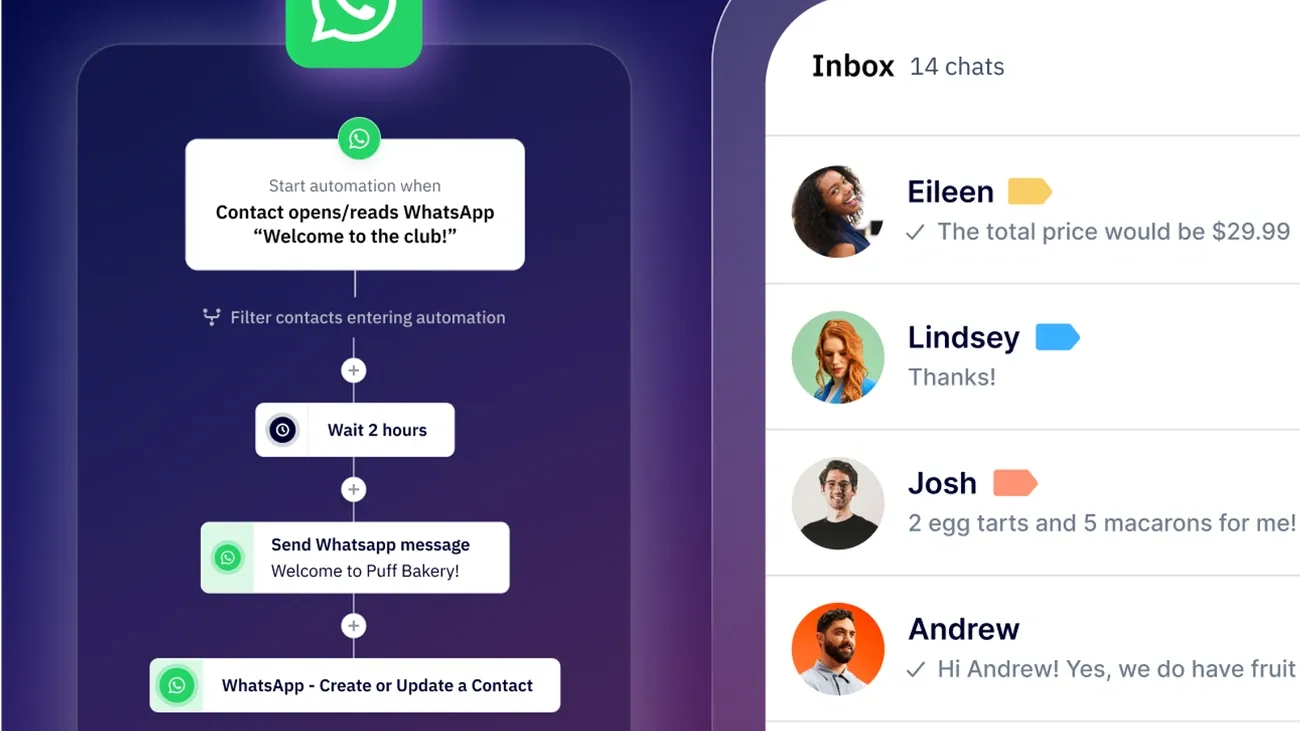
Image Source: ActiveCampaign
Now that you’ve established your business presence and built your contact list, it’s time to create messages that truly convert. With WhatsApp messages generating 72% more sessions and 89% more purchases per user than other channels, your campaign design has a direct impact on your success.
Define Your Campaign Goal
Before sending your first message, establish a clear and measurable objective. Ask yourself: what specific action do you want recipients to take? Your WhatsApp campaign goal could include:
- Book a call or consultation
- Make a purchase
- Register for a webinar or event
- Visit a physical store
- Recover abandoned carts
- Collect customer feedback
Make sure your goal is specific, achievable, and trackable. Avoid splitting customer attention between multiple offers or requests in a single message. During campaign planning, align each message with exactly one objective: this approach minimizes decision fatigue and increases the likelihood of response.
Remember that WhatsApp thrives on personal and concise communication. Focus each message on delivering a single benefit with a clear next step, rather than overwhelming customers with multiple options.
Choose the Right Message Format (Text, Image, Video)
WhatsApp offers several multimedia formats to make your campaign stand out. Choose your format based on the purpose of the message:
- Text-only messages: Best for quick updates, reminders, or urgent information
- Images: Ideal for showcasing products, visual promotions, or illustrating concepts
- Videos: Effective for demonstrations, tutorials, or building emotional connections
- Documents: Perfect for detailed information, catalogs, or specifications
- Carousels: Excellent for displaying multiple products
In general, lightweight images or short videos work best when they clarify value or support your message. However, avoid media overload: pair visuals with concise captions and a single primary call to action to guide action.
When writing your message copy, prioritize brevity and clarity. Keep sentences short, emphasize key terms with formatting (such as bold for “FLASH OFFER”), and avoid excessive emojis or ALL CAPS, which can trigger message rejection.
Use Quick Replies and Call-to-Action Buttons
Interactive elements fundamentally transform WhatsApp from a notification channel into a conversion tool. Two key features stand out:
- Quick reply buttons: These predefined response options (up to three per message) allow customers to engage with a single tap. They significantly improve response rates by eliminating the need to type.
- Call-to-action buttons: These clickable elements (maximum two per message) direct customers to external actions such as:
- Visit your website
- Make a phone call
- Add items to the cart
For optimal results, use simple, action-oriented language in your buttons with no more than 20 characters. Start with verbs like “Book now”, “Track order”, or “Get quote” to clarify the expected action.
Test different button combinations to find what drives the most clicks without compromising readability. As a result, you’ll create messages that are clear, actionable, and visually appealing without feeling intrusive.
By carefully designing your WhatsApp campaign with clear goals, appropriate message formats, and interactive elements, you’ll create conversations that not only engage but convert.
Step 4: Personalize and Automate Your Messages
Personalization transforms ordinary WhatsApp campaigns into powerful conversion engines. By combining customer data with automation, you create experiences that feel individually crafted while scaling your marketing efforts efficiently.
Use Customer Data to Personalize Messages
The most effective WhatsApp messages go beyond simply addressing recipients by name. When you integrate WhatsApp with your CRM, campaigns can leverage purchase history, preferences, and previous interactions to create truly personalized experiences. This approach allows you to consolidate chats, purchases, preferences, and support history into a unified customer profile.
Effective personalization strategies include:
- Dynamic variables that automatically tailor messages to each recipient
- Product recommendations based on browsing or purchase history
- Location-based personalization for relevant offers
- Contextually relevant images that change based on customer data
Companies that connect WhatsApp with their CRM systems report that 70% of customers expect all service agents to have the same information about them. Notably, 56% of customers complain about having to repeat themselves when speaking with new representatives. With proper personalization, you eliminate this friction point entirely.
Set Up Automated Flows for Onboarding or Cart Recovery
Automated messaging flows allow you to guide customers through specific journeys without manual intervention. For onboarding new customers, create sequences that:
- Send personalized welcome messages
- Provide step-by-step guides to key features
- Share tips and best practices
- Offer easy access to support when needed
Abandoned cart recovery represents another powerful automation opportunity. With WhatsApp, you can achieve up to a 10x increase in conversion rates with an advertising return on ad spend (ROAS) exceeding 100%. Essentially, the platform enables you to automatically send product details, special offers, and reminder messages directly to customers who left items in their shopping carts.
For maximum effectiveness, set up multi-stage recovery flows with:
- Initial reminder with product images
- Follow-up message with social proof or testimonials
- Final message with a time-limited incentive such as free shipping or a discount
Tools to Automate WhatsApp Campaigns
Several platforms make it easier to automate WhatsApp without requiring extensive technical knowledge:
WhatsApp Flows makes it easy for customers to complete actions inside the app through customizable forms. These can collect sign-ups, run surveys, recommend products, or capture leads—without leaving the conversation. Additionally, this tool helps minimize platform switching by enabling customers to complete important tasks directly within WhatsApp.
CRM Integrations allow you to track deliveries, read rates, clicks, and conversion events for each WhatsApp flow. These insights help attribute revenue to specific campaigns and templates for accurate ROI measurement.
AI-powered platforms such as CleverTap and WATI offer advanced segmentation based on real-time user behavior, demographics, and purchase history. They can create automated workflows that trigger messages based on specific customer actions, delivering the right content at the right time.
By combining personalization with automation, your WhatsApp campaigns become more relevant, timely, and effective at driving conversions while requiring less manual effort.
Step 5: Measure and Optimize Your Campaign Performance
Your WhatsApp campaign’s success depends on your ability to track, analyze, and refine your approach. Effective measurement turns good campaigns into exceptional ones through continuous improvement.
Track Read Rates, CTR, and Conversions
Setting up proper analytics is essential to understanding campaign effectiveness. First, configure tracking by adding custom code snippets to the website elements you want to monitor or implement a third-party reporting tool. Focus on these core metrics:
- Open rate: The percentage of delivered messages that users open—helps determine message engagement and optimal send times
- Click-through rate (CTR): The percentage of delivered messages with links that users click—identifies your most compelling content
- Conversion rate: The percentage of delivered messages that lead to completed actions—directly tied to your campaign goals
- Revenue generated: The value of sales driven by your WhatsApp messages—critical for ROI calculation
Many businesses discover that WhatsApp dramatically outperforms traditional channels. For example, Baro Cosmetics saw a 700% increase in conversions compared to email and 300% higher than SMS.
A/B Test Message Timing and Content
To determine what truly works, structured experimentation is crucial. First, define a single success metric that will determine your “winner”—typically CTR for website traffic goals or response rate for conversation-driven campaigns.
Consider testing:
- Different send times to identify peak engagement periods
- Various message formats (text, image, video, buttons)
- The first 60–65 characters shown in the preview—these dramatically impact open rates
When running A/B tests, make sure your sample size is sufficient for statistical validity. Holiday Pirates found through testing that WhatsApp generated 10x more engagement than their email campaigns.
Improve Based on Feedback and Data
Beyond raw metrics, look for patterns that indicate opportunities for improvement. Consistently monitor:
- People reached and engagement rates compared to pre-WhatsApp benchmarks
- Cost per qualified lead versus other channels
- Number of sales and overall revenue attribution
For sustainable improvement, maintain a consistent messaging schedule that avoids appearing spammy while keeping your business top of mind. Additionally, study your benchmarks—WhatsApp calculates the 75th percentile of read and click rates among similar businesses to help you understand where you stand.
Results can be remarkable—Tata Cliq generated $500,000 in revenue from a one-month campaign with a 10x ROI compared to conventional channels. Their data showed that customers who arrived via WhatsApp notifications were 1.7x more likely to purchase.
Conclusion
WhatsApp marketing stands out as a game-changing tool for businesses seeking higher engagement and better conversion rates. Throughout this guide, you’ve learned how this powerful platform delivers extraordinary results with 98% open rates and global reach of over 3 billion users across 180 countries.
Success with WhatsApp campaigns doesn’t happen by accident. The process starts with proper business account setup and verification, followed by building a legally compliant contact list through strategic opt-ins. After that, creating compelling, goal-focused messages with interactive elements significantly increases your chances of conversion.
Personalization unquestionably transforms standard messages into meaningful customer experiences. When combined with automation tools, you can scale these personalized interactions while maintaining authenticity and relevance. As a result, your campaigns become more effective at driving the specific actions you want customers to take.
Data and measurement determine your long-term success. Through consistent testing, analysis, and optimization based on key metrics, your WhatsApp strategy will continuously improve. The results speak for themselves: dramatically higher engagement rates, increased conversions, and stronger customer relationships compared to traditional marketing channels.
We recommend starting small, measuring everything, and scaling based on what works. Your customers already use WhatsApp daily—they’re waiting for you to connect with them there. If you have any questions about implementation, our support team will be happy to help you create successful campaigns.
Key Takeaways
Master WhatsApp marketing to tap into a channel that delivers 98% open rates and reaches 3.3 billion users globally—here’s what you need to know:
• Set up properly from the start: Choose between WhatsApp Business App (small businesses) or API (enterprise), verify your business account, and understand messaging limits to build credibility and avoid compliance issues.
• Build consent-based contact lists: Collect explicit opt-ins through websites, QR codes, and social media, then segment audiences by behavior, location, and purchase history for targeted messaging that converts.
• Create focused, interactive campaigns: Define one clear goal per message, use rich media strategically, and implement quick reply buttons and call-to-action elements to guide customers toward specific actions.
• Leverage personalization and automation: Connect WhatsApp to your CRM for tailored messaging based on customer data, and set up automated flows for onboarding and cart recovery to scale personal experiences.
• Measure and optimize continuously: Track open rates, CTR, and conversions while A/B testing message timing and content to improve performance—WhatsApp campaigns can deliver 10x higher engagement than email.
When executed correctly, WhatsApp marketing transforms customer communication from one-way broadcasting into genuine conversations that drive measurable business results and build lasting relationships.
FAQs
Q1. How do I start a successful WhatsApp marketing campaign? Begin by setting up a WhatsApp Business account, defining clear campaign goals, and building a consent-based contact list. Create focused, interactive messages with rich media and call-to-action buttons. Integrate with your CRM for personalization, and continuously measure and optimize your campaign performance.
Q2. What is the 24-hour messaging window in WhatsApp Business? The 24-hour messaging window is a rule that allows businesses to respond to customer-initiated conversations within 24 hours without using pre-approved message templates. After this period, businesses must use approved templates or wait for the customer to message again to restart the window.
Q3. How can I grow my WhatsApp subscriber list effectively? Grow your subscriber list by implementing opt-in opportunities on your website, social media, and physical locations using QR codes. Clearly communicate the benefits of subscribing and ensure all opt-ins are compliant with WhatsApp’s policies and local regulations.
Q4. What are some effective strategies for WhatsApp marketing? Effective strategies include segmenting your audience for targeted messaging, personalizing content based on customer data, automating flows for onboarding and cart recovery, and integrating WhatsApp into your broader marketing strategy. Also, focus on providing value through exclusive content and interactive elements like polls or contests.
Q5. How can I measure the success of my WhatsApp marketing campaigns? Track key metrics such as open rates, click-through rates, and conversion rates. Use A/B testing to optimize message timing and content. Compare WhatsApp performance against other channels, and analyze cost per lead and revenue attribution. Regularly review these metrics to refine your approach and improve campaign effectiveness.
